
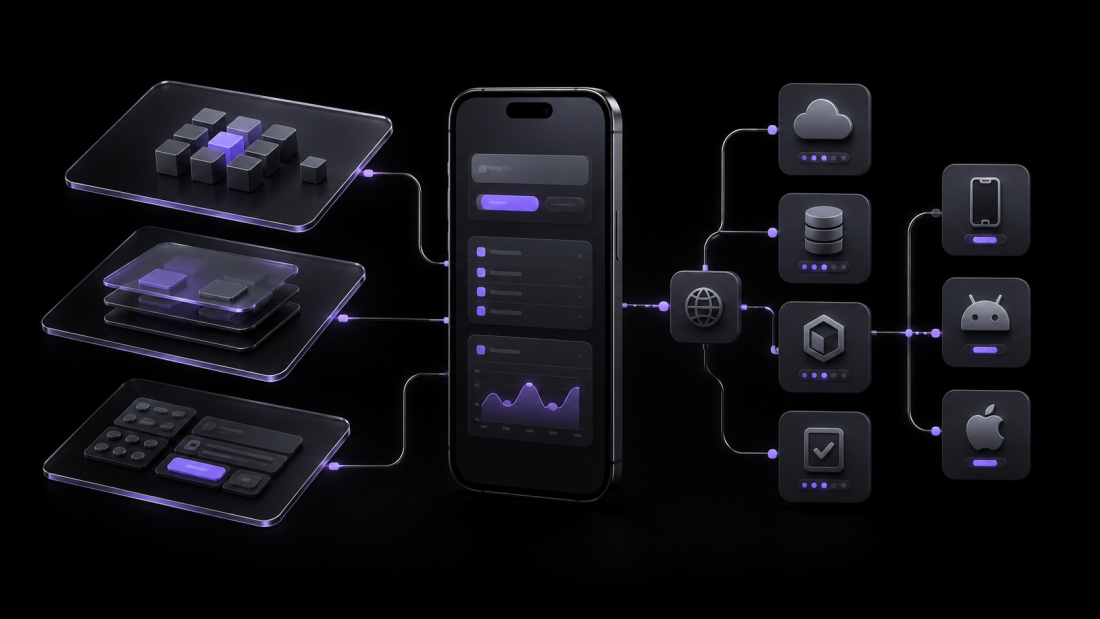
A Flutter app can look polished and still be difficult to maintain. The warning signs usually appear after the first release: a small change breaks an unrelated screen, API errors are handled differently across features, business rules live inside widgets, and developers become afraid to update dependencies.
The solution is not to add more folders or copy a large “clean architecture” template. A production Flutter app needs clear responsibilities, predictable data flow, testable boundaries, and enough structure for the product’s actual complexity.
I have seen the same lesson across Flutter products involving REST APIs, Firebase, booking flows, live tracking, payments, notifications, and inherited codebases: architecture is valuable only when it makes delivery safer.
This guide explains how I approach production Flutter app architecture without overengineering it.
## What “production-ready architecture” actually means
Architecture is not a folder tree. It is the set of decisions that determines:
– where UI state lives;
– where business rules are executed;
– how data enters and leaves the app;
– which layer owns caching, retries, and error mapping;
– how external packages and platform services are isolated;
– how a feature can be tested without launching the entire application; and
– how safely another developer can change the code six months later.
A useful architecture reduces the number of places a developer must inspect before making a change. If adding one API field requires edits across ten almost-empty classes, the architecture is working against the team.
The official [Flutter architecture guide](https://docs.flutter.dev/app-architecture/guide) recommends separating applications into UI and data layers, with an optional domain layer for complex logic. That is a strong starting point, but it should be adapted to the product rather than treated as a rigid template.
## Start with responsibilities, not state-management packages
BLoC, Riverpod, Provider, and GetX can all manage state. None of them defines the complete architecture of an application.
Before choosing a package, answer four questions:
1. Who owns the current UI state?
2. Who retrieves and updates application data?
3. Who translates infrastructure failures into states the UI understands?
4. Where do business rules live when they are more complex than presentation logic?
If those responsibilities are unclear, replacing one state-management package with another will not solve the underlying problem.
My preference is to keep views focused on presentation and user interaction. A view should render state and forward events. It should not know how authentication tokens are refreshed, how API responses are cached, or when a failed request is safe to retry.
## A practical feature-first structure
For a medium or large application, I generally prefer organizing code by feature and separating responsibilities inside each feature:
“`text
lib/
app/
app.dart
router/
theme/
config/
core/
error/
networking/
storage/
logging/
widgets/
features/
authentication/
presentation/
views/
widgets/
state/
data/
models/
repositories/
services/
domain/ # Add only when the feature needs it
entities/
use_cases/
bookings/
presentation/
data/
domain/
main.dart
“`
This structure keeps related code close together. A developer working on bookings can inspect one feature instead of jumping between global `screens`, `models`, `controllers`, and `services` directories.
The exact directory names are less important than the dependency direction. Presentation can depend on application-facing abstractions. Business logic should not depend on widgets. Data implementations should not leak raw HTTP or plugin details into the UI.
## The presentation layer: render state and forward intent
The presentation layer normally contains views, reusable feature widgets, and a view model, notifier, controller, Cubit, or BLoC.
Its responsibilities include:
– exposing the state required by the UI;
– reacting to user actions;
– coordinating loading, success, empty, and failure states;
– formatting application data for display; and
– triggering navigation or one-time UI effects through a deliberate mechanism.
It should not contain raw API calls, database queries, token-storage logic, or duplicated business validation.
One useful test is to ask: “Could I test this decision without rendering a widget?” If the answer is yes, that decision probably does not belong inside the widget.
### Model explicit UI states
Avoid representing a screen with several unrelated booleans:
“`dart
bool isLoading;
bool hasError;
bool isEmpty;
“`
These flags can produce impossible combinations. A single explicit state is safer:
“`dart
sealed class BookingState {}
final class BookingInitial extends BookingState {}
final class BookingLoading extends BookingState {}
final class BookingLoaded extends BookingState {
BookingLoaded(this.bookings);
final List<Booking> bookings;
}
final class BookingEmpty extends BookingState {}
final class BookingFailure extends BookingState {
BookingFailure(this.message, {this.canRetry = true});
final String message;
final bool canRetry;
}
“`
The UI can now render one valid condition at a time, and tests can verify every transition.
## The data layer: own data policy, not presentation
The data layer usually contains repositories and services.
### Services isolate external systems
A service wraps one external data source, such as:
– a REST endpoint;
– Firebase Authentication or Firestore;
– secure device storage;
– a WebSocket connection;
– location services; or
– a native platform plugin.
Services should focus on communication and serialization. They should not decide which message to show to a user or which screen to open.
Wrapping third-party packages behind a small internal interface also reduces dependency risk. If a package changes or must be replaced, the impact remains contained.
### Repositories own application data behavior
A repository provides the application-facing source of truth for a type of data. Depending on the feature, it may coordinate:
– remote and local services;
– caching;
– refresh behavior;
– retry rules;
– mapping DTOs into application models;
– session-level state; and
– offline fallback.
For example, a booking repository can decide whether to return cached bookings immediately, refresh them in the background, or fail because authentication must be renewed. The view should receive a meaningful result rather than raw status codes and JSON maps.
This boundary becomes especially important when a product has multiple integrations. Without it, every screen gradually develops its own networking conventions.
## Add a domain layer only when the logic earns it
A domain layer is helpful when business logic:
– combines data from multiple repositories;
– is reused by multiple presentation components;
– has several rules or decision branches;
– must remain independent of Flutter and infrastructure; or
– benefits from focused unit testing.
It is unnecessary when a use case simply calls one repository method and returns the same value. That creates another file without creating a meaningful boundary.
The Flutter team also describes the domain layer as optional in its [architecture recommendations](https://docs.flutter.dev/app-architecture/recommendations). The correct question is not “Does this project use clean architecture?” It is “Which complexity are we isolating, and what becomes easier to change or test?”
## Keep errors meaningful across layers
Production applications fail in more ways than “something went wrong.” A request may fail because of:
– no network connection;
– an expired session;
– invalid input;
– a timeout;
– server maintenance;
– permission denial;
– stale local data; or
– an unexpected programming error.
Raw exceptions should not travel directly from an HTTP client or plugin into widgets. Map infrastructure failures into a small application-level error model:
“`dart
sealed class AppFailure {}
final class NetworkFailure extends AppFailure {}
final class UnauthorizedFailure extends AppFailure {}
final class ValidationFailure extends AppFailure {
ValidationFailure(this.fields);
final Map<String, String> fields;
}
final class ServerFailure extends AppFailure {
ServerFailure({this.requestId});
final String? requestId;
}
final class UnexpectedFailure extends AppFailure {}
“`
The presentation layer can then decide how each failure should appear. It may show a retry action for a timeout, redirect to sign-in for an expired session, and show field-level feedback for validation errors.
This produces better UX and makes failures easier to log and diagnose.
## Dependency injection should make dependencies visible
Dependency injection is useful when it makes object relationships explicit and replaceable. It should not turn the application into a hidden global service locator.
A class should declare what it needs:
“`dart
class BookingRepository {
BookingRepository({
required BookingApiService api,
required BookingCache cache,
}) : _api = api,
_cache = cache;
final BookingApiService _api;
final BookingCache _cache;
}
“`
This repository can be tested with controlled implementations. Its dependencies are visible to anyone reading the constructor.
Whether the app wires these objects with Riverpod, `get_it`, providers, or manual composition is a secondary decision. The important part is that domain and data classes do not fetch hidden global dependencies internally.
## Architecture must include environments and observability
Many architecture discussions stop at state management, but production reliability also depends on operational decisions.
### Separate environments
Development, staging, and production should not accidentally share the same backend, Firebase project, analytics stream, or credentials. Environment configuration should be explicit and selected during the build process.
### Centralize logs and crash context
Production logs should help answer:
– which app version failed;
– which environment was active;
– which operation failed;
– whether the user was authenticated;
– which request or correlation ID is associated with the failure; and
– what state transition happened before the crash.
Do not log passwords, tokens, payment details, or personal data. Useful observability requires context, not sensitive information.
## Design the architecture for testing
Testability is one of the clearest signals that responsibilities are separated correctly.
A practical strategy includes:
– **unit tests** for business rules, mappings, and state transitions;
– **widget tests** for important UI states and interactions; and
– **integration tests** for critical journeys such as authentication, checkout, booking, or submission.
Flutter’s [testing documentation](https://docs.flutter.dev/testing/overview) recommends combining these test levels because they provide different trade-offs in speed, maintenance cost, and confidence.
Architecture helps by allowing each layer to be tested at the right level. A repository can be tested without rendering the UI. A view model can be tested with a fake repository. A widget can be tested with deterministic state instead of a live backend.
Do not chase coverage as a vanity number. Prioritize code where a failure would affect revenue, user data, security, or a core workflow.
## Common signs of overengineering
Architecture becomes harmful when the ceremony is larger than the problem. Warning signs include:
– one interface and one implementation for every class without a replacement or testing need;
– use cases that only forward a repository call;
– multiple model types with identical fields and no boundary-specific purpose;
– generic base classes that hide normal control flow;
– a “core” folder containing unrelated application features;
– navigation, networking, and state changes triggered through global singletons; and
– developers copying files because the template requires them, not because the feature needs them.
Small features should remain small. Consistency is important, but consistency does not require equal complexity everywhere.
## How to improve an inherited Flutter codebase safely
Rewriting an existing app is rarely the first step. I prefer an incremental approach:
### 1. Establish a baseline
Confirm that the current code builds, tests run, and the major user journeys are understood. Record known crashes, slow screens, and release blockers.
### 2. Map responsibilities
Identify where networking, storage, authentication, state, navigation, and business rules currently live. The purpose is to find risky coupling, not to judge folder names.
### 3. Protect a critical flow
Add tests around one high-value journey before restructuring it. This reduces the risk of “cleaning” the code while changing behavior.
### 4. Introduce one boundary at a time
Move a raw API call behind a service. Put data behavior in a repository. Extract complex business rules only where needed. Avoid migrating every feature in one large branch.
### 5. Measure the result
The refactor should produce a visible improvement: fewer duplicated paths, safer tests, clearer ownership, faster debugging, or easier feature delivery. If it does not, reconsider the abstraction.
## Production Flutter architecture checklist
Before calling an architecture production-ready, verify that:
– widgets do not perform raw network or database operations;
– UI state has explicit loading, success, empty, and failure paths;
– repositories own caching and data-source decisions;
– external packages are isolated where replacement or testing risk exists;
– authentication and token refresh follow one consistent path;
– errors are mapped into application-level failures;
– environment configuration is separated;
– sensitive values are not committed or logged;
– important business rules have focused tests;
– critical user journeys have integration coverage;
– crash reports include useful, non-sensitive context;
– features can be changed without editing unrelated modules; and
– the structure is documented well enough for another developer to follow.
## Final perspective
The best Flutter architecture is not the one with the most layers. It is the one that allows a team to understand change, test important behavior, isolate failures, and release confidently.
Start with clear UI and data responsibilities. Add a domain layer when business complexity justifies it. Keep dependencies visible, model failures deliberately, and make operational concerns part of the design.
If you are planning a production Flutter app—or dealing with an inherited codebase that has become difficult to release—I can review the architecture, identify the highest-risk areas, and recommend a practical improvement path. You can review my Flutter projects https://sufiyanrazaq.com/project/ or contact me: https://sufiyanrazaq.com/contact/ to discuss the codebase.